
If you want to show ads between your posts, first go to your Layouts
tab. Then, in the "Blog Posts" section, click on "Edit." A pop-up
window will appear with options to configure your blog posts. Check the
box next to "Show Ads Between Posts." (Note: You must be signed up for AdSense before you can check this box.)
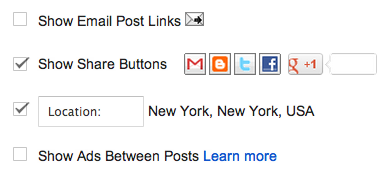 Once you check this box you'll see the configuration options for your
ads. You can then select how often you would like ads to be shown after
your posts.
Once you check this box you'll see the configuration options for your
ads. You can then select how often you would like ads to be shown after
your posts.
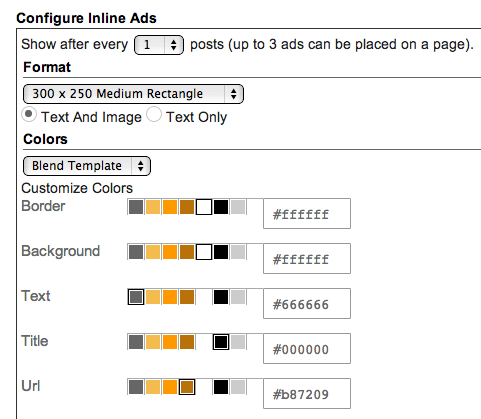 For example, if you want ads to be displayed after every post, select
"1" from the drop-down menu (please note that AdSense policy limits you
to a total of 3 ad units per page, and Blogger will automatically
prevent you from going over this limit). You can then select your ad
format and colors. Once you have finished configuring your ads, click on
the orange "Save" button.
For example, if you want ads to be displayed after every post, select
"1" from the drop-down menu (please note that AdSense policy limits you
to a total of 3 ad units per page, and Blogger will automatically
prevent you from going over this limit). You can then select your ad
format and colors. Once you have finished configuring your ads, click on
the orange "Save" button.
For example, if you want ads to be displayed after every post, select
"1" from the drop-down menu (please note that AdSense policy limits you
to a total of 3 ad units per page, and Blogger will automatically
prevent you from going over this limit). You can then select your ad
format and colors. Once you have finished configuring your ads, click on
the orange "Save" button.
Comments
Post a Comment