
Intel
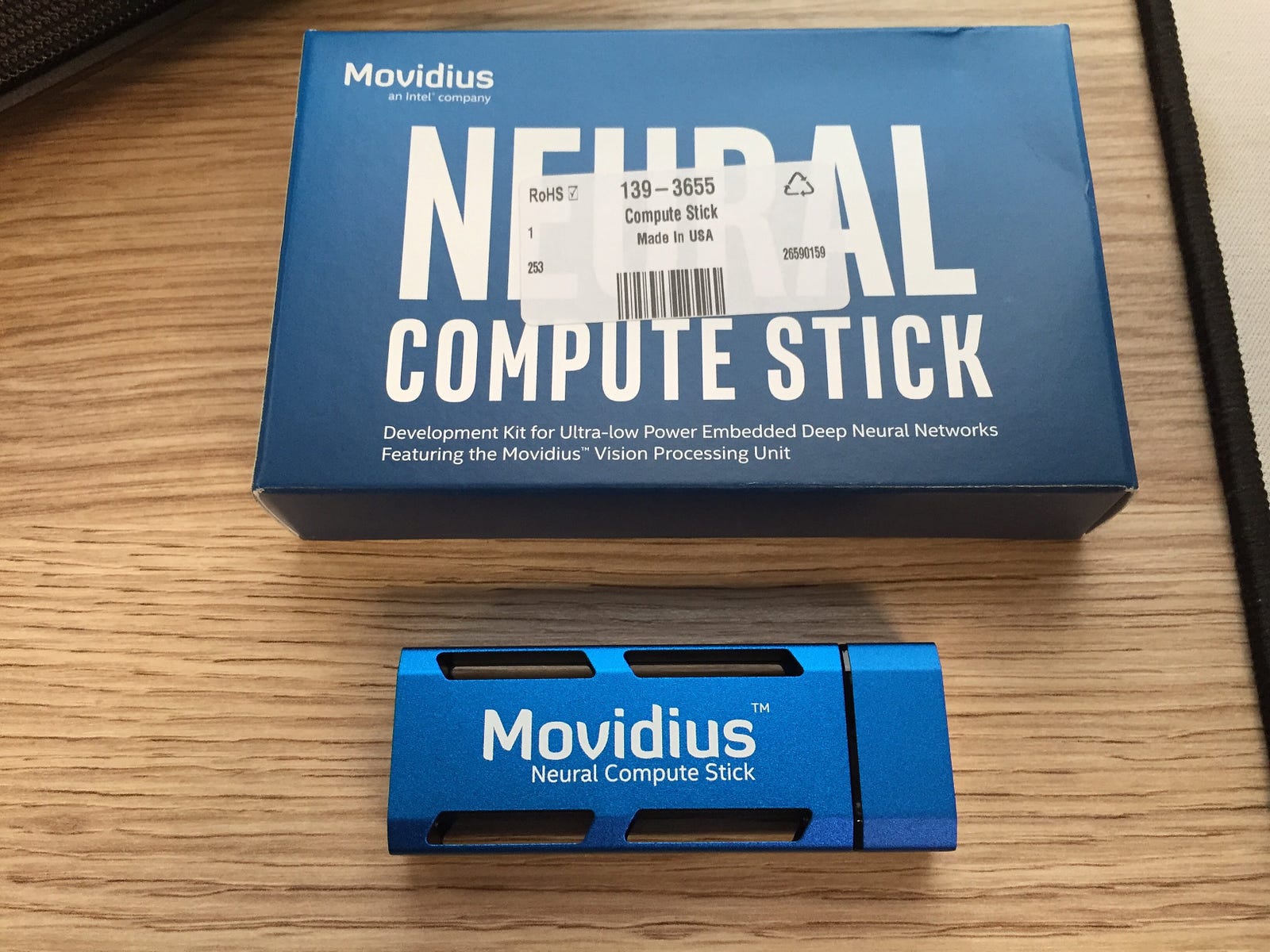
Movidius is an interesting piece of hardware that could work on
embedded system like Raspberry Pi that will enable neural network
computing. Even thought is only supported under Linux, we could always
use Oracle Virtual Box to get it to work on Mac or Windows platform.
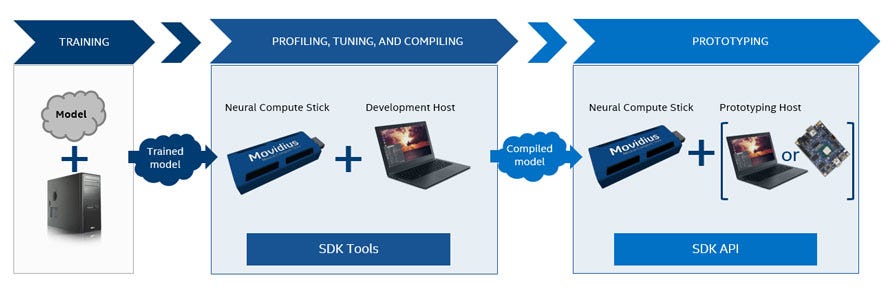
Intel Movidius also support both Caffe and TensorFlow models and the typical workflow is as follow :-
The full documentation is available at Intel Movidius NCSDK[1]
In
this post, I will be focusing on how to get started on Oracle Virtual
Box and Rapsberry Pi 3 Model B environment using Ubuntu 16.x variant.
Oracle Virtual Box
Grab the installation from Oracle Virtual Box download[2] and install the Extension Pack.
Before
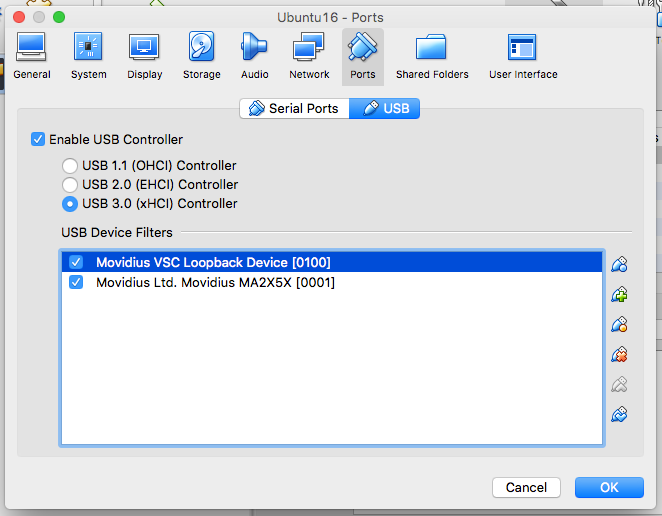
install Ubuntu 16.x, configure/add the following USB devices. Note that
Intel Movidius has two modes, hence two different device configurations
are needed
Configuration 1
Name : Movidius VSC Loopback Device [0100]
Vendor ID : 03e7
Product ID : f63b
Revision : 0100
Manufacturer : Movidius
Product : VSC Loopback Device
Configuration 2
Name : Movidius Ltd. Movidius MA2X5X [0001]
Vendor ID : 03e7
Product ID : 2150
Revision : 0001
Manufacturer : Movidius Ltd.
Product : Movidius MA2X5X
As shown as image below, the configuration require for Oracle Virtual Box USB devices using Configuration 1 and Configuration 2
Raspberry Pi 3 Model B
Currently
I am using NOOBS from Raspberry official website[3]. Note that we need
to attach to a display and keyboard+mouse for the initial install. After
that everything will be headless by turning on the SSH on Raspberry Pi 3
Model B. The raspberry folks has quite good documentation from
Raspberry Documentation[4] on turning on SSH login
Raspberry Pi has a bit more work to install OpenCV from source[5] which include
1. Increasing swap size
We also need to increase swap size by editing the file at /etc/dphys-swapfile with the following, CONF_SWAPSIZE=2048 to have 2GB swap memory
then issue the following commands to take effects
We also need to increase swap size by editing the file at /etc/dphys-swapfile with the following, CONF_SWAPSIZE=2048 to have 2GB swap memory
then issue the following commands to take effects
$ sudo /etc/init.d/dphys-swapfile stop
$ sudo /etc/init.d/dphys-swapfile start
2. Clean upWe going to remove wolfram and libreoffice to save some space which come with default with NOOBS
$ sudo apt-get purge wolfram-engine
$ sudo apt-get purge libreoffice*
$ sudo apt-get clean
$ sudo apt-get autoremove
3. Install dependenciesThe dependencies include build tools and some development libraries essential to build Open CV
$ sudo apt-get update && sudo apt-get upgrade
$ sudo apt-get install build-essential cmake pkg-config
$ sudo apt-get install libjpeg-dev libtiff5-dev libjasper-dev libpng12-dev
$ sudo apt-get install libavcodec-dev libavformat-dev libswscale-dev libv4l-dev
$ sudo apt-get install libxvidcore-dev libx264-dev
$ sudo apt-get install libgtk2.0-dev libgtk-3-dev
$ sudo apt-get install libcanberra-gtk*
$ sudo apt-get install libatlas-base-dev gfortran
$ sudo apt-get install python2.7-dev python3-dev
4. Download Open CV sourceWe need to build both opencv and opencv_contrib source code
$ cd ~
$ wget -O opencv.zip https://github.com/Itseez/opencv/archive/3.3.0.zip
$ unzip opencv.zip
$ wget -O opencv_contrib.zip https://github.com/Itseez/opencv_contrib/archive/3.3.0.zip
$ unzip opencv_contrib.zip
5. Compile Open CV sourceWe will be compiling Open CV from source for the ARM platform
$ cd ~/opencv-3.3.0/
$ mkdir build
$ cd build
$ cmake -D CMAKE_BUILD_TYPE=RELEASE \
 -D CMAKE_INSTALL_PREFIX=/usr/local \
 -D OPENCV_EXTRA_MODULES_PATH=~/opencv_contrib-3.3.0/modules \
 -D ENABLE_NEON=ON \
 -D ENABLE_VFPV3=ON \
 -D BUILD_TESTS=OFF \
 -D INSTALL_PYTHON_EXAMPLES=OFF \
 -D BUILD_EXAMPLES=OFF ..
6. Last step for Open CVWe going to move the default installed library (cv2.cpython-35m-arm-linux-gnueabihf.so) as cv2.so
$ cd /usr/local/lib/python3.5/site-packages/
$ sudo mv cv2.cpython-35m-arm-linux-gnueabihf.so cv2.so
7. Install TensorFlowWe need to install ARM version of TensorFlow for Raspberry Pi 3 Model B
$ wget https://github.com/lhelontra/tensorflow-on-arm/releases/download/v1.4.0/tensorflow-1.4.0-cp35-none-linux_armv7l.whl
$ pip3 install tensorflow-1.4.0-cp35-none-linux_armv7l.whl
General Intel Movidius Install
These steps apply for both Oracle Virtual Box and Raspberry Pi 3 Model B setup
$ sudo apt-get install git
$ git clone https://github.com/movidius/ncsdk
$ cd ncsdk
$ make install
Testing and Benchmark
I did some benchmark test using ncappzoo from https://github.com/movidius/ncappzoo using the following steps
$ git clone https://github.com/movidius/ncappzoo
$ cd ncappzoo/apps/benchmarkncs
$ ./mobilenets_benchmark.sh | grep FPS

Comparison in term of run time speed between using time command
Raspberry Pi 3 Model B:
real 40m56.595s
user 36m41.170s
sys 0m58.780s
Raspberry Pi 3 Model B:
real 40m56.595s
user 36m41.170s
sys 0m58.780s
Oracle Virtual Box:
real 11m52.631s
user 4m43.956s
sys 0m37.612s
real 11m52.631s
user 4m43.956s
sys 0m37.612s
It
seem like Intel Movidius performance is in par between embedded system
(Raspberry Pi 3 Model B) and a desktop / laptop system (Oracle Virtual
Box). The only drawback during the test is the amount of time
to run the test but I guess the important point is running the neural
network model.
According
to Intel Movidius official site[6], possible applications cover
robotics, AR/VR, Wearables and Smart Security. One of the cool idea I
could think off is to modify some robotic car solution from Sun
Founder[7] to have Intel Movidius as vision for both self driving
capability and face recognition that could detect intruder.
Should
you have any problem or question regarding to this article, please do
not hesitate to leave a comment below or drop me an email:me@chclab.net
References :-
[1] https://movidius.github.io/ncsdk/
[2] https://www.virtualbox.org/wiki/Downloads
[3] https://www.raspberrypi.org/downloads/
[4] https://www.raspberrypi.org/documentation/remote-access/ssh/
[5] https://github.com/Itseez/opencv/archive/3.3.0.zip
[6] https://www.movidius.com/applications
[7] https://www.sunfounder.com/picar-s-kit-1502.html
[1] https://movidius.github.io/ncsdk/
[2] https://www.virtualbox.org/wiki/Downloads
[3] https://www.raspberrypi.org/downloads/
[4] https://www.raspberrypi.org/documentation/remote-access/ssh/
[5] https://github.com/Itseez/opencv/archive/3.3.0.zip
[6] https://www.movidius.com/applications
[7] https://www.sunfounder.com/picar-s-kit-1502.html